Which account and plan you need
⏱ 10 min3 steps
Claude has plans for one person and plans for companies. If it's only you, with no staff, you want a personal plan, even if you run a business. In this lesson you'll pick the you'll use and the plan that fits. You need a few minutes and a web . Not being sure which plan you're on is normal. The steps show where to look.
account A sign-in with a company, like a domain, email or hosting. Whoever owns the account controls what's in it. All wordsbrowser The app you use to visit websites, like Safari or Chrome. All wordsSteps
Pick a personal account if it's only you
Anthropic, the company that makes Claude, sells two kinds of plans:
- Personal plans: Free, Pro and Max. For one person. A one-person business with no staff belongs here.
- Team and Enterprise. For companies. Team is for 2 to 150 people who share one bill, with someone in charge of who gets in. Enterprise is for large companies.
- Count who will use Claude. If it's only you, pick a personal plan.
- Pick one email address for your Claude account. Use your own, not one your work controls.
- If you don't have an account yet, go to in your browser and sign up with that email address. A new account starts on Free.
If you hire people later and they need Claude too, that's the time to look at Team.
Claude app Claude on your phone or computer, where you chat with it by typing. claude.ai is the same thing in a web browser. All words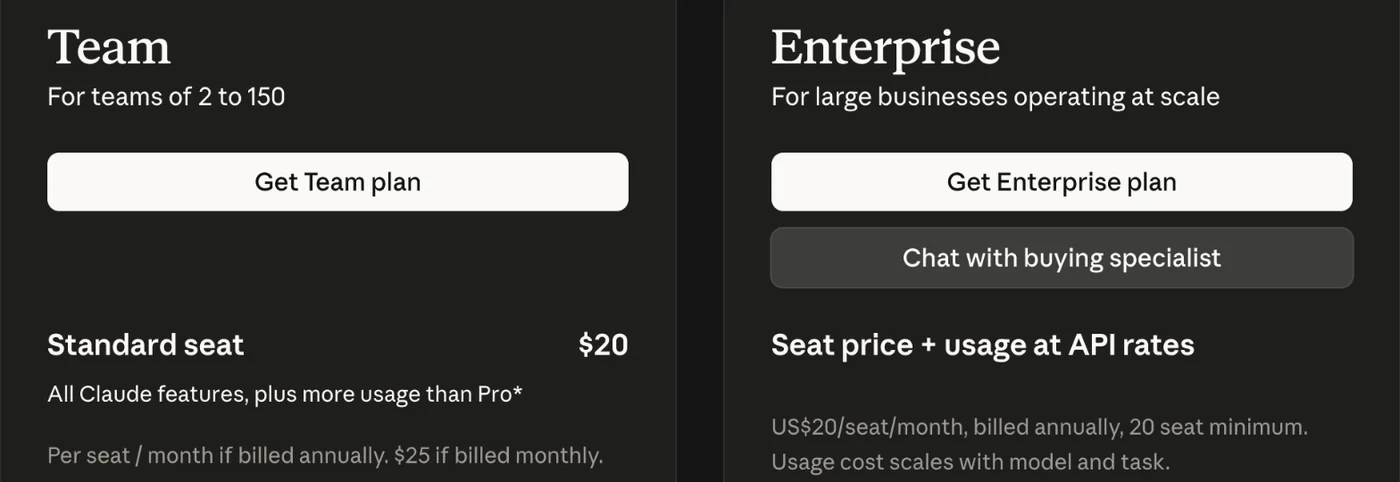
That's not what I see
- I use Claude at work and my company pays for it.
- This course is for your own projects, so with your own account, not your work one. A work account can have rules set by your company that block .sign in Tell Claude Code which Claude account is yours, so it knows you've paid for it. All wordsClaude Code Claude, working inside Terminal. It can make files and run things on your Mac, with a safety checker watching what it does. All words
- I sign up with my business email address. Does that make it a business account?
- No. Your email address doesn't decide your plan. A personal plan works with any email address you own.
See which Claude plan you're on
Go to claude.ai in your browser and sign in. Click your name or initials in the bottom-left corner, then Settings, then Billing. It names your plan.

That's not what I see
- I can't find Billing.
- Click your name or initials in the bottom-left corner of claude.ai, then Settings. Look along the top or down the left side for Billing. If you still can't find it, ask Claude in the chat box: Where do I see which plan I'm on? It knows its own menus.
- I have more than one Claude account and I'm not sure which one I'm in.
- Your email address shows under your name in Settings. Pick one account for everything you build, and sign in everywhere with that same one.
Pick the plan your path needs
Every plan, with its price and what it includes, is on the Claude plans page. Here is the short version.
- Free costs $0. It covers chatting in the app, and Claude can search the web. It doesn't include the app's tasks, or Claude Code.
- Pro costs $20 a month, or $17 a month if you pay for the year up front. It's where the app's tasks, scheduled helpers and Claude Code start. Start here when you need more than Free.
- Max starts at $100 a month. It gives you five or twenty times the use of Pro. You only need it if limits stop you most days.
Which plan each path needs:
- I run a business: Free works for Start here, Get customers, Money and paperwork, and Grow, in the app. Weekly helpers needs Pro, for the that runs on a schedule.
- I want to build something: Pro, because the Set up Claude Code section needs Claude Code.
Everyday life is on no path, and it works on Free too.
Every plan has usage limits. When you need a paid plan, start on Pro. If you hit the limit most days for a couple of weeks, move to Max. Hitting it once in a while means you had a good day, not that you need a bigger plan.
- Pick the plan your path needs. If you're paying, pick Pro, unless you already know you'll use Claude all day.
- Change your plan on the same Billing page in Settings, then come back.
Prices change. These were checked on Anthropic's pricing page on October 21, 2026. Check claude.com/pricing before you pay.
scheduled task A job Claude does on its own on a schedule, like every morning, even when your computer is closed. All wordsinbox watcher A scheduled task in the Claude app that reads your new mail each morning and tells you what needs you. It changes nothing. All words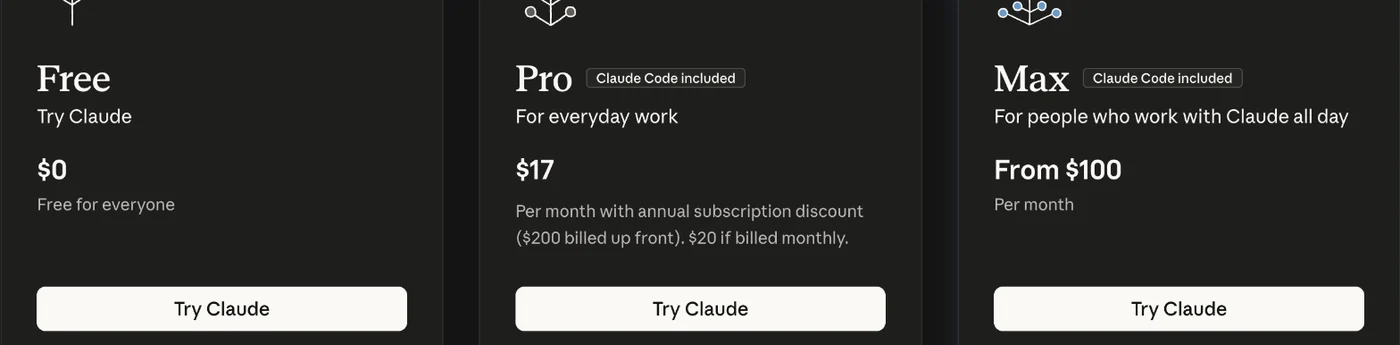
That's not what I see
- It says I've reached my limit.
- Limits reset every five hours, and paid plans have a weekly limit too. If it happens once in a while, take a break and come back. If it happens most days for two weeks, that's when Max starts paying for itself.
- I'm not sure if I should pay yearly.
- Pay monthly for the first month or two. Once you know you're using it every week, yearly saves $40 a year on Pro.
Your challenge
Write down which account you use for Claude, which plan you picked and today's date. Two weeks from now, look at how many days you hit a limit, and decide whether your plan still fits.
Helpful extras
Last checked 2026-10-21
Start here
Which account and plan you need
One-page card · print it or keep it open
What you'll do
Claude has plans for one person and plans for companies. If it's only you, with no staff, you want a personal plan, even if you run a business.
The steps
- Pick a personal account if it's only you
- See which Claude plan you're on
- Pick the plan your path needs
If it goes wrong
- I use Claude at work and my company pays for it. This course is for your own projects, so sign in with your own account, not your work one. A work account can have rules set by your company that block Claude Code.
- I can't find Billing. Click your name or initials in the bottom-left corner of claude.ai, then Settings. Look along the top or down the left side for Billing. If you still can't find it, ask Claude in the chat box: Where do I see which plan I'm on? It knows its own menus.
- It says I've reached my limit. Limits reset every five hours, and paid plans have a weekly limit too. If it happens once in a while, take a break and come back. If it happens most days for two weeks, that's when Max starts paying for itself.
Words
- usage limit: How much you can use Claude before it asks you to wait a while. Bigger plans have bigger limits.
- Team plan: A Claude plan for a company of 2 to 150 people, with one bill and someone in charge of who gets in.